Paper becomes data.
Scan or upload a document: Luneo reads it, classifies it and extracts the key fields — supplier, amount, due date — each paired with a confidence score. Zero re-keying.
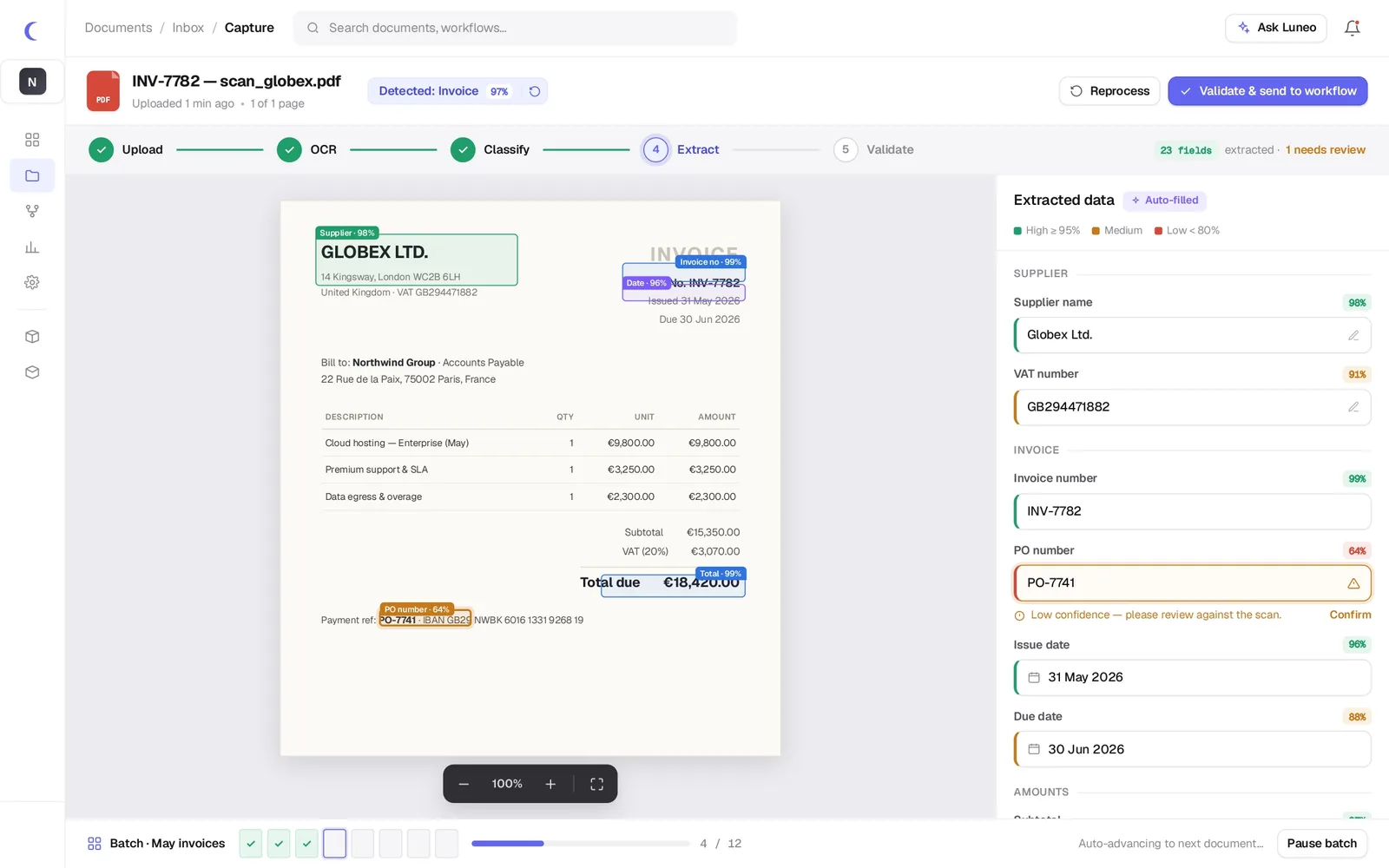
Hover over the document, read the extracted data
Move over a detected zone on the invoice: the matching field lights up on the right, with its normalised value and confidence score.
| Description | Amount |
|---|---|
| Cloud hosting, enterprise | €9,800.00 |
| Premium support · annual | €3,750.00 |
| VAT (20 %) | €1,000.00 |
| Total due | €14,550.00 |
From capture to search, in five steps
Confidence score
Every field is scored; human review is only requested below a threshold.
Multilingual
Recognition across 12 languages, including mixed-language and handwritten documents.
Extraction models
Invoices, contracts, purchase orders, standard forms or your own templates. Data feeds the intelligent DMS.
Tables & line items
Extraction of tables and line items, not just headers.
Sovereign data
OCR runs on infrastructure hosted in France; nothing leaves the EU.
Export & webhook
Push extracted data to your ERP, your accounting system or via the 30+ native integrations.
Everything you need to know about Luneo OCR
Which document formats does Luneo OCR support?
Luneo OCR supports PDF (native and scanned), JPEG, PNG and TIFF images, mobile captures and files received by email. Multi-page documents and hybrid PDFs (partially scanned) are also supported.
Does the OCR work with handwritten documents?
Luneo recognises printed characters with very high accuracy. For handwritten documents, recognition depends on legibility. Forms with checkboxes are fully supported and extracted automatically.
How does Luneo extract structured data from a document?
Luneo combines OCR with AI extraction models: after digitisation, it identifies key zones in the document (header, table, signature) and extracts the configured fields (amount, date, supplier reference…). Each extracted value comes with a confidence score.
Can you configure your own extraction fields?
Yes. Extraction models are configurable without code: you define the fields to extract (name, type, expected format) and Luneo applies them automatically to every new document of the same type, without any technical intervention.
Test extraction on your documents
Bring a few invoices or contracts: we show you the extracted data live. No commitment.