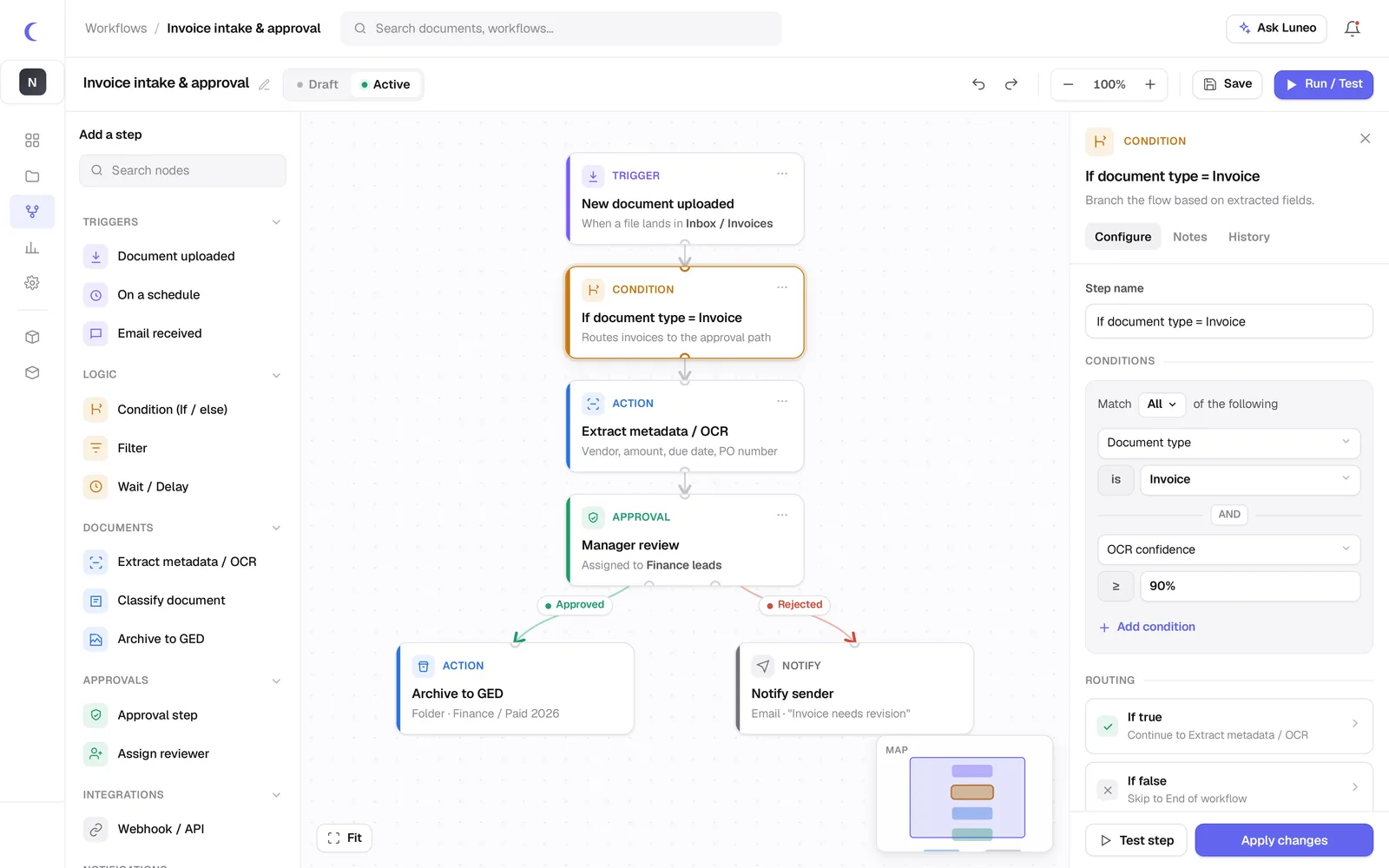
Draw a circuit. Luneo runs it.
Drag triggers, conditions and actions onto a canvas. Your teams build their own approval flows — no developer, no IT ticket.
How much time would Luneo save you?
Drag the slider to your monthly document volume. The estimate updates in real time.
Savings Estimator
Start from a ready-to-use workflow
Five node types, infinite possibilities
Every circuit is made of blocks anyone can read. No hidden logic: what you see on the canvas is exactly what runs.
Built to hold up in production
Conditions & branches
If/else logic, parallelism and loops — no scripting required.
SLA & reminders
Per-step deadlines, escalations and automatic notifications.
Actions & API
Call your systems mid-circuit via webhook.
Multi-level sign-off
Cascading approvals with delegation and substitution.
Full traceability
Every run logged, replayable and auditable.
Circuit versions
Edit as a draft, publish when you're ready.
Everything you need to know about Luneo workflows
Do I need to know how to code to create workflows with Luneo?
No. The Luneo workflow editor is 100% no-code: you build your document circuits by drag-and-drop on a visual canvas. No line of code is needed. Business teams design their own workflows without depending on IT.
What node types are available in Luneo workflows?
Luneo offers five node types: Trigger (document receipt, form, schedule), Condition (business rules and branching), Action (send email, fire webhook, update metadata), Approval (human sign-off with delegation and escalation) and Delay (scheduled or conditional wait).
Can workflows send automatic notifications?
Yes. Each workflow step can trigger notifications by email, Teams or Slack. Approvers receive a direct link to the document to validate. If there is no response, the automatic escalation can nudge or reassign the task.
Is it possible to create multi-level approval circuits?
Yes. Luneo workflows support sequential, parallel or conditional approvals. You can configure multiple approvers with quorum rules (e.g. 2 out of 3 approvals are enough) and automatic escalation delays.
Automate your first circuit
Start with your most time-consuming process. We model it together in a demo, no commitment.